Every year, Apple releases a major iOS version, followed by incremental updates that refine the experience, fix bugs, and introduce smaller but impactful features. December updates, in particular, tend to be more than just maintenance—they often bring meaningful usability improvements and security enhancements ahead of the new year.
The iOS 26.2 update, released in December 2025, is exactly that kind of update. While it may not completely overhaul your iPhone like the initial iOS 26 release, it introduces a series of thoughtful improvements that affect everyday usage—ranging from security upgrades and smarter notifications to better customization and enhanced app functionality.
This article explores everything changing in iOS 26.2, what it means for users, and whether you should install it.
A Quick Overview of iOS 26
Before diving into iOS 26.2, it’s important to understand the foundation it builds upon.
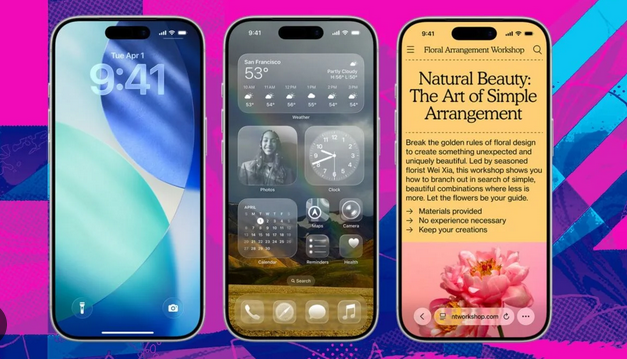
iOS 26 introduced a major redesign with a new “Liquid Glass” interface, improved customization, enhanced privacy controls, and deeper integration of intelligent features across apps.
The system also added updates to apps like Wallet, Journal, CarPlay, and Accessibility tools, making iPhones more adaptive and user-friendly.
iOS 26.2 builds on this foundation—not by reinventing it, but by refining and expanding it.
Release Date and Device Compatibility
The iOS 26.2 update was officially released on December 12, 2025, and is available for:
- iPhone 11 and newer
- iPhone SE (2020 and later)
Older devices, especially those with outdated chipsets, are no longer supported under iOS 26.
This marks Apple’s continued push toward modern hardware optimization.
Smarter File Sharing: AirDrop Gets a Security Upgrade
AirDrop Codes for Safer Sharing
One of the standout features in iOS 26.2 is a major update to AirDrop.
Previously, sharing files with strangers or non-contacts could be risky or inconvenient. Now, Apple introduces AirDrop verification codes.
Here’s how it works:
- The receiving device generates a unique code
- The sender enters this code to complete the transfer
- The connection remains valid for up to 30 days
This adds a critical layer of security, especially in public environments like airports or cafes.
Why It Matters
- Prevents accidental sharing with unknown devices
- Reduces spam AirDrop requests
- Improves trust when sharing files with new contacts
This change reflects Apple’s broader focus on privacy-first design.
Urgent Alerts: Notifications That Break Through Silence
“Urgent” Reminders and Alarms
iOS 26.2 introduces a new Urgent priority level for reminders and alarms.
Unlike regular notifications, urgent alerts can:
- Override Do Not Disturb mode
- Bypass Focus filters
- Demand immediate attention
This feature is particularly useful for:
- Medical reminders
- Work deadlines
- Time-sensitive tasks
Real-Life Impact
Imagine missing an important medication alert because your phone is on silent. With urgent alerts, that problem is eliminated.
Accessibility Improvements: Making iPhones More Inclusive
Screen Flash for Notifications
A notable addition is the screen flash notification feature.
When enabled:
- Your screen briefly flashes at full brightness
- You can combine it with LED flash alerts
- It works alongside sound and vibration
This is especially beneficial for:
- Users with hearing impairments
- People in noisy environments
Broader Accessibility Vision
Apple continues to expand accessibility tools across iOS, ensuring devices are usable for everyone regardless of physical ability.
Lock Screen Customization Gets Better
More Control Over Liquid Glass Design
The Liquid Glass interface introduced in iOS 26 receives refinements in iOS 26.2.
Users now get:
- Adjustable opacity levels
- More personalization options
- Better visual balance between widgets and wallpapers
Why It Matters
Customization isn’t just aesthetic—it improves usability by allowing users to prioritize important information while maintaining visual clarity.
CarPlay Enhancements for Drivers
Apple continues improving CarPlay with subtle but meaningful updates.
New Features
- Option to disable pinned conversations in Messages
- Improved widget integration
- Better dashboard organization
Driving Experience Impact
These changes make CarPlay:
- Less distracting
- More customizable
- Safer to use while driving
Apple Music and Podcasts Upgrades
Apple Music Improvements
Music lovers will notice:
- Offline lyrics support
- Better playlist organization
- “Favorite Songs” integration into Top Picks
Podcasts Get Smarter
Podcasts now feature:
- AI-generated chapters
- Timed references within episodes
This makes long-form content easier to navigate and consume.
Apple Games App Enhancements
Gaming also gets attention in iOS 26.2.
What’s New
- Improved filtering and sorting in game library
- Better controller support
- Real-time game stats
Why It Matters
Apple is slowly strengthening its gaming ecosystem, making iPhones more viable for serious gaming.
Notification Experience Gets a Visual Boost
In addition to urgent alerts, Apple enhances how notifications are delivered.
New Features
- Visual alert customization
- Screen flash option
- Improved notification visibility
These changes ensure users never miss important alerts, regardless of environment.
Security Fixes: The Most Important Invisible Upgrade
While new features grab attention, security updates are arguably the most critical part of iOS 26.2.
Key Security Improvements
Apple patched vulnerabilities across:
- FaceTime (caller ID spoofing risks)
- WebKit (Safari engine vulnerabilities)
- Kernel (potential privilege escalation)
- Photos (hidden album privacy issues)
- Messages and Screen Time data leaks
Why You Should Care
These fixes protect against:
- Hackers exploiting system weaknesses
- Unauthorized data access
- Malware attacks
Even if you don’t notice them, these updates are essential.
Performance and Stability Improvements
Like most mid-cycle updates, iOS 26.2 focuses heavily on:
- Bug fixes
- System stability
- Faster performance
Users may notice:
- Smoother animations
- Faster app launches
- Fewer crashes
These improvements make everyday use more reliable.
Changes to Reminders and Productivity
The Reminders app gets a subtle but powerful upgrade.
New Capability
- Mark reminders as urgent
- Attach alarms directly to tasks
Productivity Impact
This bridges the gap between:
- Task management
- Time management
Making iPhones more useful as productivity tools.
Regional and Feature-Specific Updates
Some features are region-specific.
Examples
- Live translation for AirPods (EU regions)
- Enhanced safety alerts in select countries
This reflects Apple’s strategy of rolling out features gradually across regions.
A Push Toward Mandatory Updates?
Interestingly, reports suggest Apple may be limiting older update options for newer iPhones, nudging users toward iOS 26.2.
This could signal:
- A stronger push for unified software adoption
- Faster rollout of security updates
How to Install iOS 26.2
Updating your iPhone is simple:
- Open Settings
- Tap General
- Select Software Update
- Download and install iOS 26.2
Make sure your device is:
- Connected to Wi-Fi
- Charged above 50%
Should You Update?
Reasons to Update
- Improved security
- Better notifications
- Enhanced customization
- New AirDrop safety features
Reasons to Wait
- Minor bugs (if any early issues appear)
- Compatibility concerns with older apps
For most users, updating is highly recommended.
Final Thoughts: A Refinement That Matters
iOS 26.2 may not be a flashy update, but it plays a crucial role in refining the iPhone experience.
It strengthens:
- Security
- Usability
- Accessibility
- Customization
While the headline features like AirDrop codes and urgent alerts stand out, the real value lies in the countless small improvements working behind the scenes.